Pocket Server Portable Archive Back Memory — A Portable Griot
Let’s start with a truth that feels like a low-grade fever in the back of every Black history keeper’s mind: memory is fragile when it lives on someone else’s land. We know this in our bones. We’ve seen the photos that didn’t survive the move, the stories lost between generations, the physical archives of Black Wall Street turned to literal ash. Now we live in the digital age, and we’ve traded one kind of fragility for another—uploading our family photos, our auntie’s voice notes, our digital scrapbooks to platforms that can shadow-ban, algorithmically obscure, or delete our accounts on a whim. The cloud isn’t a sanctuary; it’s a storage unit with a landlord who doesn’t know your name. This is where the pocket server portable archive black memory project begins. It’s not about a new gadget. It’s about an ancient practice, updated: the griot carrying the story, the grandmother safeguarding the album, the community preserving its record. It’s about building a home for Black memory that fits in your hand and answers to no one but you.
Pocket Server Portable Archive Black Memory is Beyond the Cloud: Why Black Memory Needs a Home It Owns
You have to understand what we’re up against to see why this isn’t just tech—it’s defense. For centuries, the archive of Black life has been a target. The burning of Tulsa wasn’t just about buildings; it was about ledgers, newspapers, portraits—proof of existence going up in smoke, as documented by the Smithsonian’s National Museum of African American History and Culture. Today, the erasure is quieter but just as systemic. A family reunion video gets flagged and buried by a platform’s content moderators who don’t understand the context. A decade of political organizing chats on a messaging app vanishes when the service shuts down. Your entire photo library is held hostage by a subscription fee you can’t afford next month.
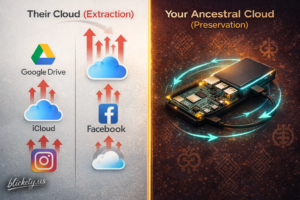
The pocket server portable archive black memory concept fights this with a simple Afro-Futurist principle: If you don’t own the infrastructure, you don’t own the future. Our ancestors knew this. They built their own schools, banks, newspapers—infrastructure for a reality the mainstream refused to acknowledge, a tradition explored in depth by the African American Intellectual History Society. The digital equivalent isn’t a bigger Facebook group. It’s a server you control. A personal cloud that doesn’t require an internet connection to access your own grandmother’s face. This is archival justice as a daily practice. It’s saying our stories are too sacred to be data-mined, our faces too valuable to train facial recognition algorithms without our consent, our legacy too important to leave on a server farm in a desert we’ll never see.
Pocket Server Portable Archive Black Memory: Reimagining the Pocket Server
So forget everything you’ve read about “pocket servers” as cool toys for coders. We’re not building a toy. We’re assembling a digital griot’s pouch. In West African tradition, the griot is more than a storyteller; they are the living, breathing archive of a people, a family, a lineage, a role preserved and studied by institutions like the British Library’s Endangered Archives Programme. They carry the names, the victories, the migrations. Their memory is the community’s bedrock.
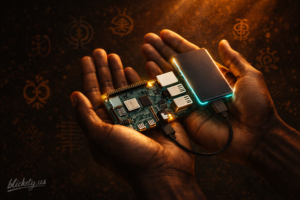
This device is that function, translated for the diaspora. The hardware—often a Raspberry Pi single-board computer and a sturdy portable solid-state drive (SSD)—is the physical pouch. You choose it for resilience, for low power, for the ability to be tucked in a bag and survive a journey. The software—programs like Nextcloud for files and PiGallery2 for photos—becomes the ritual language, the method of organization. It’s the modern equivalent of the specific fold in the kinte cloth that denotes a particular history. Setting it up isn’t just installation; it’s a conscious act of preparing a vessel for sacred cargo. You are appointing yourself the griot of your own lineage, and this is your tool. When you build this pocket server portable archive black memory, you’re continuing a lineage that predates the silicon chip by centuries.
Building Your Portable Ancestral Cloud: A Ritual in Three Acts 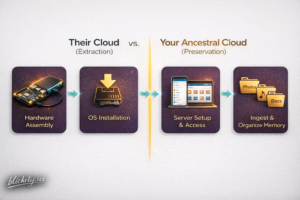
This isn’t as hard as it sounds. If you can follow a recipe, you can do this. Think of it as a ritual in three acts, a practical application of the DIY ethos celebrated by maker communities like Adafruit.
- Act I: Gathering the Bones (The Hardware). You need a body for this digital ancestor. Start with a Raspberry Pi 4 or 5 (the brain), a 256GB or larger SSD (the heart/memory), a protective case, and a small power bank. Total cost? Often under $150—less than a year of some cloud subscriptions. This kit becomes your portable memory palace. The Raspberry Pi Foundation provides excellent beginner guides to these components.
- Act II: Breathing Life (The Software). This is the incantation. You’ll use free, open-source software. The main step is installing an operating system called Raspberry Pi OS to a microSD card, then using its installer to set up Nextcloud, a powerful self-hosted platform whose documentation is maintained by a global open-source community. Nextcloud is the key—it creates a private, beautiful web interface on the Pi itself. Once it’s running, you connect to it from any phone or laptop on your home Wi-Fi (or even directly, offline). There are countless gentle guides from sites like RaspberryPi.com and Nextcloud.com that hold your hand through this. The goal isn’t to become a sys-admin; it’s to become a keeper.
- Act III: The First Offering (Ingesting Memory). Now, the ceremony begins. Connect to your new private server from your phone. Upload the scanned photos from the ’70s. Create a folder for your father’s old sermons saved as MP3s. Make a gallery for your child’s art. This is the act of placing the artifacts in the tomb, knowing you—and only you—hold the key. The pocket server portable archive black memory is now alive. For digitizing tips, the Library of Congress’s personal digital archiving guide is an invaluable, free resource.
From Single Node to Constellation: The Networked Future of Black Memory
But here’s the Afro-Futurist leap—the vision that turns a personal act into a communal architecture. Imagine if every household, every lineage keeper, had one of these. Not just one, but a network. Software like Syncthing could allow these pocket servers to talk to each other securely, peer-to-peer, a concept aligned with the decentralized web principles discussed by the Electronic Frontier Foundation. Your cousin’s server in Atlanta could hold a mirrored copy of your oral history interviews. Your sister’s device in Houston could sync the family photo tree.
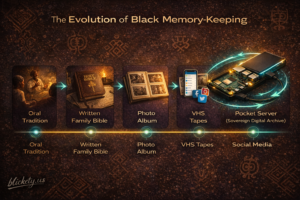
Suddenly, you’re no longer looking at a single pocket server portable archive black memory. You’re looking at a constellation of memory. A decentralized, resilient, Black-owned digital commons. No corporate middleman, no loss if one home is damaged, no algorithm deciding what’s important. This is how you build a digital Black Wall Street—not as one monolithic tower, but as a thriving, interconnected district of self-owned stores of value, echoing the community trust models researched by the Brookings Institution. The value here is us. Our story. Our proof of passage. This networked approach to a pocket server portable archive black memory transforms personal security into collective power.
The most radical technology isn’t always the one that flashes the brightest. Sometimes, it’s the one that endures. The one that hums quietly in the corner, holding the light of a people safe through the night. Building a pocket server portable archive black memory is a small, profound act of love for your past and faith in your future. It is a brick in the palace of time we are building for our descendants. They will look back not at a fragmented, corporately-curated highlight reel, but at a rich, sovereign, and complete tapestry of where they came from. And they’ll have you—the 21st-century griot with a computer in your pocket—to thank. This is the work. This pocket server portable archive black memory is your tool. In case you missed it the article about the smart pen is right here.
FAQ Section
- Q: I’m not technical at all. Can I really do this? A: Yes. The hardest part is believing you can. The actual steps are well-documented with pictures and videos by educational nonprofits like Kano Computing. Think of it like assembling flat-pack furniture with online help. The reward is a piece of functional, sovereign infrastructure you built yourself.
- Q: Is this secure? What if someone hacks it? A: Because it’s not connected to the open internet 24/7 (you typically turn it on when you need it), it’s inherently less exposed than a public cloud account, a security principle often called “air-gapping” discussed by the SANS Institute. For local network use, it’s very secure. You are its only gatekeeper.
- Q: What’s the difference between this and just using an external hard drive? A: An external hard drive is a digital closet. This is a digital library. The server software (like Nextcloud) adds a searchable, browsable, beautiful interface accessible from any device on your network. It organizes and presents your memory as a living collection, not a messy pile of files, enhancing what archivists at the University of Texas call “digital curation.”